Hello,
NOTE: in this post, we are going to follow another approach of explaining things...
We are going to follow the first thing that it might come in mind. Then we are going to think it over and see the simplicity of things. This is an experimental way of approaching a matter and covers the case where things are not that clear in our mind regarding the best approach to follow. Sometimes I find people accepting solutions "as is" without considering to challenge them. With this approach, we are going to rethink some approaches in order to determine which is the simplest and best. Make sure that you read until the end. We are all busy and we want the solution fast. But, trust me, there is more into it than just accepting the solution.
This is another quick hint regarding extending business components base classes.
--wooow.. what do you mean by: "extending business components base classes"???
Well, with JDeveloper 11g you can set which classes will be extended by your business components..
--wooow.. what do you mean by "you can set which classes will be extended by your business components"??? (well, actually, this sentence must show a kind of mocking tone.. but I find it difficult to write it and not describe it.. )
Hmm.. I see.... Every Business Component (Entity, View Object, Application Module etc...) is described by an xml file.
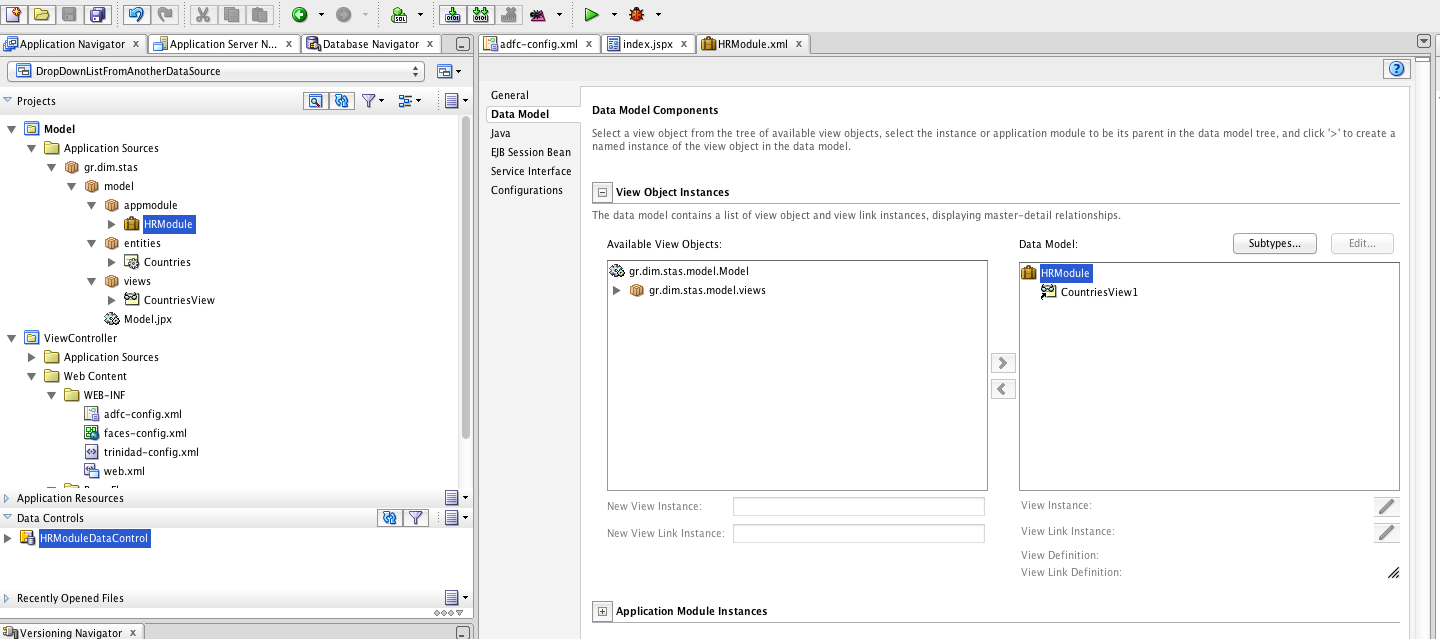
For instance, in this example, we are going to create an ADF BC application that uses HR tables. Those tables are going to be Employees and Departments.
--wooow... what do you mean by "Employees and Departments "??
(I wonder... dude... where is my car??)
(--Just kidding..----- Oo --->)
For those of you who need a refresher about how to generate Business Components from tables, here is a refresher.
After we have generated the BC (do not ask me how... hit the link above.. above, not below..)
-woooow........................ just kidding..
Anyway, we have the ability to write some custom logic for all our View Objects, the ones already generated and the ones to be generated in the not so distant future, only once.
(where is the wooow now ha?)
-keep calm and carry on.. (I think there is a debate about that phrase, or poster.. something about copyright or something.. by the way I do not own anything of that phrase.. I do not own anything.. )
--wooow...
Lets say that we want to place some logging when executeQueryForCollection method is called on every View Object in our application.
-- I know! I know! I know! pick me, pick me pick me!!
okay... ( what the furniture aka wtf is that??)
--You extend the View Object's Class and you place the Logger there.
hoooray!! what about the rest 912783416293847162394817234912846434'1\234!@#$4#!@# View Objects??
---woooow...... what do you mean by that big number with characters that reminded me of Asterix and Obelix???
I mean, that there is a possibility to have more than a reasonable amount of View Objects to extend..
--soo? What is the problem? Are you lazy? is that it?
Yes, I do not want to keep extending and extending and going and going (like that battery advertisement), repeating the same work over and over again... I want to be DRY
---woooow.. when did you got WET ??
.... "I have to return some video tapes" (which movie was it and which actor! the hidden challenge! Brought to you by dstas! The winner will get his/her name right here in this zupa fly post as the first correct answer! *No cookies involved* )
Alright.. lets do it in a different way..
Lets go to the Departments View Object! shall we?
--okay...
Do you see an java classes there?
--No.. there arent any....
Are you sure..
--Yeeah.. unless they are hidden.. are they hidden??
Yes! they are! you cannot touch this! Evil spirits and a big purple bear will hide the sunshine that goes through your morning orange juice glass and hits your spoon with which you eat your korn flakes!! No sunshine for you!!! (just kidding.. )
--wooow.. So lets generated them with JDeveloper.. It is simple dude.. Just press the pencil button and then check the darn check box! then press OK!! How difficult is that!!!!?????? See the screens below please dude.. you are killing me... you are really killing me dude..
oh God.. (choose whatever accent you want, but apply the "There is no salvation" tone please)

--There you go dude! It is ready..now apply your logger wherever you want..
Okay.. I will..
Oh wait a second.. what about Employees View Object? what should I do? I want to have the exact same logger there.. any hints?
-- Dude.. why are you blogging such dump staff?? Is not it obvious?? Just perform the same process. -----Good (oh no, I wanted to say Goood not good, it is a God with many oooo in order to emphasise the anger..)
Okay.. Lets pretend that I did that.. The great pretender.. Oh wait! I just got a message from the Boss via twitter (and received it more than 10 times since I am following, facebook, twitter, google+, LinkedIn and 10 other social or whatever else networks) that we have to create 300 View Objects more..
--Okay.. so?
....
Are you expecting me to generate all those java classes, are you?
--Dude, I know all hotkeys by heart (byHeart= ctrl+b+H) in JDeveloper, I can work with out a mouse, I am a Ninja duper super masta gangsta waka mama loca Bosa Nova when it comes to using JDeveloper.. I can do it in a snap!
Okay.. I am not like that..
--Only the brave and the fittest and those with the Knowledge (The Horror, The Horror) should handle such requests.
good God (spelled properly)..
Are You open to ideas?
--From you?? ahahaha... well, lets give it a try..
We could compete who is going to implement it faster, what do you say? You can throw all the ninja bomb smokes and asterisks you want.. what do you say?
--ahahahahahahah there is no way you can compete me on this!! Bring it on!
Here is my solution:
1) Create a new class that extends oracle.jbo.server.ViewObjectImpl;

-- 23 classes generated so far dude... I am on fire!!
2) Override the executeQueryForCollection method and place your logger (System.out for the simplicity here in this example)

--123 classes generated so far dude.... you are still in one class!! Not even a View Object.... I am even talking on the phone planning my next vacation dude!! That is what I call productivity with choice!!
3) go to your model project and right click-> properties. Expand "ADF Business Components Node" and select Base Classes. Then In the View Object value change the value from ViewObjectImpl to MyViewObjectImpl
 --200 classes dude!!! What is that? What are you doing there?
Actually, I am done.
--What? yeah right..
Really, I am done.
--wooow... how did you do that? Just wait a minute... Is this applied to all View Objects???
The last screen shows which classes are going to be used by default by ADF when it comes to using the View Objects. By default oracle.jbo.server.ViewObjectImpl is going to be used for every View Object in our application.
--Aaaand how I am going to tell that a ViewObject extends my custom class properly???
It is very easy. Just go to your
All View Objects that do not have yet generated their java class, will use our new class.
In order to verify if this already done properly (There is a strange behaviour here see note below) Check the source of the xml file:

If there is no ComponentClass in the source file, the default ViewObjectImpl java class will be used.
========================================================================
NOTE: It seems that there is some "strange functionality in the versions tested 11.1.1.6.0 and 11.1.2.1.0" The change is not reflected until a View Object is edited. By edited I mean to check the Classes Extend of the view object.

You will see the custom class there, even though the ComponentClass tag is not generated in the xml source. By just doing this and the pressing ok the change will be reflected.
This a strange behaviour and it does not seem that right.
Another thing you can do is to manually set the ComponentClass tag to those View Objects that existed prior to extending the base classes.
========================================================================
All View Objects that already had their class generated, will not use it, unless we change the extension manually. All previous classes where extending the default one which was oracle.jbo.server.ViewObjectImpl.
All View Objects that will generate their class, will extend our custom class which is MyViewObjectImpl.java
--wooow.. that is smart... And what about my 200 classes? What should I do now?
Well since you generated them.. you will have to manually update the extends part to the custom ViewObjectImpl class that extends the oracle.jbo.server.ViewObjectImpl class
--woow... Thanks Dude.. That was really nice and fast!
Yeap. One thing to remember here is that a careful design is needed when it comes to extending base classes of BC.
One must always keep in mind that all BC (depending on what you extend of course) will use the Base class that you will define. So, for example, if you have a base class with abstract methods, all ViewObjects that have not generated their classes (and have properly set the ComponentClass tag in their source.), will throw an exception!!
You could see something like the following:
(oracle.jbo.JboException) JBO-29000: Unexpected exception caught: java.lang.InstantiationException, msg=null
Cheers!
NOTE: in this post, we are going to follow another approach of explaining things...
We are going to follow the first thing that it might come in mind. Then we are going to think it over and see the simplicity of things. This is an experimental way of approaching a matter and covers the case where things are not that clear in our mind regarding the best approach to follow. Sometimes I find people accepting solutions "as is" without considering to challenge them. With this approach, we are going to rethink some approaches in order to determine which is the simplest and best. Make sure that you read until the end. We are all busy and we want the solution fast. But, trust me, there is more into it than just accepting the solution.
This is another quick hint regarding extending business components base classes.
--wooow.. what do you mean by: "extending business components base classes"???
Well, with JDeveloper 11g you can set which classes will be extended by your business components..
--wooow.. what do you mean by "you can set which classes will be extended by your business components"??? (well, actually, this sentence must show a kind of mocking tone.. but I find it difficult to write it and not describe it.. )
Hmm.. I see.... Every Business Component (Entity, View Object, Application Module etc...) is described by an xml file.
For instance, in this example, we are going to create an ADF BC application that uses HR tables. Those tables are going to be Employees and Departments.
--wooow... what do you mean by "Employees and Departments "??
(I wonder... dude... where is my car??)
(--Just kidding..----- Oo --->)
For those of you who need a refresher about how to generate Business Components from tables, here is a refresher.
After we have generated the BC (do not ask me how... hit the link above.. above, not below..)
-woooow........................ just kidding..
Anyway, we have the ability to write some custom logic for all our View Objects, the ones already generated and the ones to be generated in the not so distant future, only once.
(where is the wooow now ha?)
-keep calm and carry on.. (I think there is a debate about that phrase, or poster.. something about copyright or something.. by the way I do not own anything of that phrase.. I do not own anything.. )
--wooow...
Lets say that we want to place some logging when executeQueryForCollection method is called on every View Object in our application.
-- I know! I know! I know! pick me, pick me pick me!!
okay... ( what the furniture aka wtf is that??)
--You extend the View Object's Class and you place the Logger there.
hoooray!! what about the rest 912783416293847162394817234912846434'1\234!@#$4#!@# View Objects??
---woooow...... what do you mean by that big number with characters that reminded me of Asterix and Obelix???
I mean, that there is a possibility to have more than a reasonable amount of View Objects to extend..
--soo? What is the problem? Are you lazy? is that it?
Yes, I do not want to keep extending and extending and going and going (like that battery advertisement), repeating the same work over and over again... I want to be DRY
---woooow.. when did you got WET ??
.... "I have to return some video tapes" (which movie was it and which actor! the hidden challenge! Brought to you by dstas! The winner will get his/her name right here in this zupa fly post as the first correct answer! *No cookies involved* )
Alright.. lets do it in a different way..
Lets go to the Departments View Object! shall we?
--okay...
Do you see an java classes there?
--No.. there arent any....
Are you sure..
--Yeeah.. unless they are hidden.. are they hidden??
Yes! they are! you cannot touch this! Evil spirits and a big purple bear will hide the sunshine that goes through your morning orange juice glass and hits your spoon with which you eat your korn flakes!! No sunshine for you!!! (just kidding.. )
--wooow.. So lets generated them with JDeveloper.. It is simple dude.. Just press the pencil button and then check the darn check box! then press OK!! How difficult is that!!!!?????? See the screens below please dude.. you are killing me... you are really killing me dude..
oh God.. (choose whatever accent you want, but apply the "There is no salvation" tone please)

--There you go dude! It is ready..now apply your logger wherever you want..
Okay.. I will..
Oh wait a second.. what about Employees View Object? what should I do? I want to have the exact same logger there.. any hints?
-- Dude.. why are you blogging such dump staff?? Is not it obvious?? Just perform the same process. -----Good (oh no, I wanted to say Goood not good, it is a God with many oooo in order to emphasise the anger..)
Okay.. Lets pretend that I did that.. The great pretender.. Oh wait! I just got a message from the Boss via twitter (and received it more than 10 times since I am following, facebook, twitter, google+, LinkedIn and 10 other social or whatever else networks) that we have to create 300 View Objects more..
--Okay.. so?
....
Are you expecting me to generate all those java classes, are you?
--Dude, I know all hotkeys by heart (byHeart= ctrl+b+H) in JDeveloper, I can work with out a mouse, I am a Ninja duper super masta gangsta waka mama loca Bosa Nova when it comes to using JDeveloper.. I can do it in a snap!
Okay.. I am not like that..
--Only the brave and the fittest and those with the Knowledge (The Horror, The Horror) should handle such requests.
good God (spelled properly)..
Are You open to ideas?
--From you?? ahahaha... well, lets give it a try..
We could compete who is going to implement it faster, what do you say? You can throw all the ninja bomb smokes and asterisks you want.. what do you say?
--ahahahahahahah there is no way you can compete me on this!! Bring it on!
Here is my solution:
1) Create a new class that extends oracle.jbo.server.ViewObjectImpl;

-- 23 classes generated so far dude... I am on fire!!
2) Override the executeQueryForCollection method and place your logger (System.out for the simplicity here in this example)

--123 classes generated so far dude.... you are still in one class!! Not even a View Object.... I am even talking on the phone planning my next vacation dude!! That is what I call productivity with choice!!
3) go to your model project and right click-> properties. Expand "ADF Business Components Node" and select Base Classes. Then In the View Object value change the value from ViewObjectImpl to MyViewObjectImpl

Actually, I am done.
--What? yeah right..
Really, I am done.
--wooow... how did you do that? Just wait a minute... Is this applied to all View Objects???
The last screen shows which classes are going to be used by default by ADF when it comes to using the View Objects. By default oracle.jbo.server.ViewObjectImpl is going to be used for every View Object in our application.
--Aaaand how I am going to tell that a ViewObject extends my custom class properly???
It is very easy. Just go to your
All View Objects that do not have yet generated their java class, will use our new class.
In order to verify if this already done properly (There is a strange behaviour here see note below) Check the source of the xml file:

If there is no ComponentClass in the source file, the default ViewObjectImpl java class will be used.
========================================================================
NOTE: It seems that there is some "strange functionality in the versions tested 11.1.1.6.0 and 11.1.2.1.0" The change is not reflected until a View Object is edited. By edited I mean to check the Classes Extend of the view object.

You will see the custom class there, even though the ComponentClass tag is not generated in the xml source. By just doing this and the pressing ok the change will be reflected.
This a strange behaviour and it does not seem that right.
Another thing you can do is to manually set the ComponentClass tag to those View Objects that existed prior to extending the base classes.
========================================================================
All View Objects that already had their class generated, will not use it, unless we change the extension manually. All previous classes where extending the default one which was oracle.jbo.server.ViewObjectImpl.
All View Objects that will generate their class, will extend our custom class which is MyViewObjectImpl.java
--wooow.. that is smart... And what about my 200 classes? What should I do now?
Well since you generated them.. you will have to manually update the extends part to the custom ViewObjectImpl class that extends the oracle.jbo.server.ViewObjectImpl class
--woow... Thanks Dude.. That was really nice and fast!
Yeap. One thing to remember here is that a careful design is needed when it comes to extending base classes of BC.
One must always keep in mind that all BC (depending on what you extend of course) will use the Base class that you will define. So, for example, if you have a base class with abstract methods, all ViewObjects that have not generated their classes (and have properly set the ComponentClass tag in their source.), will throw an exception!!
You could see something like the following:
(oracle.jbo.JboException) JBO-29000: Unexpected exception caught: java.lang.InstantiationException, msg=null
Cheers!